


Can You Recommend Tutorials for Laser Cutting and Engraving?
If you’ve ever stared at a blank workpiece and thought, “What should I engrave next?” —you’re not alone. Every geek laser engraver, from hobbyist to side-hustler to full-on maker entrepreneur, hits that moment. The good news? We’re living in the golden age of laser creativity, where laser engraving tutorials, laser cutting tutorials, and DIY laser engraving ideas are more accessible than ever, along with high-quality laser engraving files, SVG files for laser cutting, and ready-to-use laser design resources.
In this guide, I’ll walk you through a curated set of laser engraver projects and beginner laser engraving guides covering real-world scenarios—personalized laser engraved gifts, laser cut home decor, custom engraved jewelry, and laser engraved signage—across a wide range of materials like wood, glass, leather, metal, acrylic, fabric, paper, and stone.
Even better: every project includes free laser engraving files, downloadable laser templates, laser cutting blueprints, and proven laser engraver settings, so you can skip the guesswork and go straight to making.
👉 Free tutorial library:
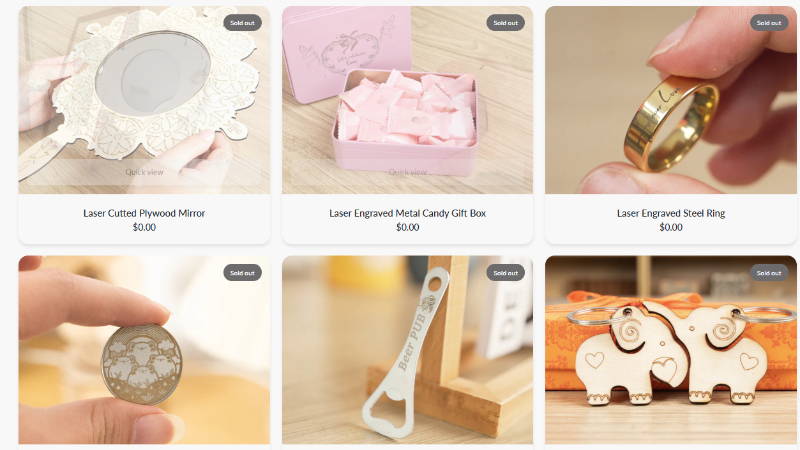
Free Laser Engraving, Cutting Files and Works
Why Tutorials Matter for Laser Engraving
Let’s be honest—laser engraving isn’t just about owning a machine. It’s about mastering laser engraving workflow, laser cutting techniques, and engraving speed optimization, including laser power and speed settings, cutting depth control, and engraving resolution settings.
Good tutorials help you:
· Avoid burning, charring, or warping materials
· Dial in laser engraver settings and LightBurn settings guide optimization quickly
· Understand vector engraving vs raster engraving and grayscale engraving technique
· Learn real-world applications and profitable laser engraving projects that sell
Instead of trial-and-error frustration, you get a repeatable laser engraving workflow supported by material testing grids and parameter calibration.

1. Personalized Gifts & Crafts (High Demand, High ROI)
Personalized products are where laser engraving shines—literally and financially. These laser engraving ideas that sell are perfect for building a laser engraving business or Etsy laser engraving products lineup.
🔥 Popular Gift Ideas
· Custom name plaques (engraved name signs)
· Engraved photo frames (photo engraving settings)
· Personalized tumblers
· Holiday ornaments
· Wedding keepsakes (custom engraved products)
🪵 Best Materials
· Wood (birch plywood, basswood engraving, hardwood engraving techniques)
· Acrylic (clear acrylic engraving, frosted acrylic engraving)
· Leather (leather laser engraving settings, vegetable tanned leather engraving)
⚙️ Example Settings (Starter Baseline)
· Wood engraving: 3000–6000 mm/min, 20–40% power (wood laser engraving settings)
· Acrylic cutting: 200–500 mm/min, 80–100% power (acrylic laser cutting settings)
· Leather engraving: 2000–4000 mm/min, 15–30% power
💡 Pro Tip
Use masking tape on wood or acrylic to reduce smoke stains. It’s a small trick that dramatically improves finish quality and enhances engraving contrast control.
📁 What You Get in Tutorials
· Ready-to-use vector files for engraving (SVG, DXF files for laser engraver)
· Pre-configured LightBurn tutorial settings and G-code file preparation
· Step-by-step DIY laser engraving workflow
These projects are perfect if you're testing custom engraving services or small business laser cutting opportunities.
👉 Free tutorial library:
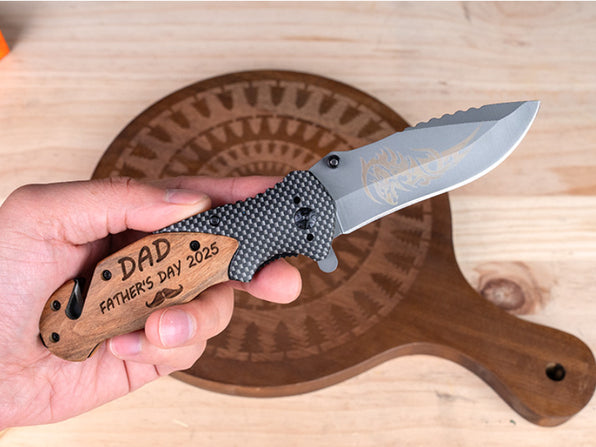
Free laser engraving, cutting files and works in Personalized Gifts & Crafts Scenes
2. Home Decor Projects (Where Creativity Meets Function)
Laser engraving transforms ordinary living spaces into personalized environments using laser cut wall art, layered wood mandala designs, and custom LED signs.
🏠 Project Ideas
· Wall art panels
· Layered mandala designs
· Custom clocks
· LED-lit acrylic signs
· Engraved coasters
🧱 Materials Used
· Wood (plywood laser cutting, basswood engraving)
· Acrylic (acrylic edge polishing, clear acrylic engraving)
· Stone (slate laser engraving, granite engraving technique)
⚙️ Example Settings
· Wood cutting (3mm): 300–600 mm/min, 90–100% power (cutting depth control)
· Acrylic engraving: 2000–4000 mm/min, 20–30% power
· Stone engraving: 1000–2500 mm/min, 40–70% power (stone laser engraving settings)
💡 Pro Tip
For stone engraving, spray a thin layer of paint before engraving—this improves engraving contrast control and visibility.
Why These Tutorials Matter
They teach layering techniques, laser kerf adjustment, and visual composition, which are essential for premium-looking decor and laser engraved home decor products.
👉 Free tutorial library:
Free Laser Engraving, Cutting Files and Works in Home Decor Scenes

3. Jewelry Engraving (Precision is Everything)
Jewelry is where your laser skills get seriously tested. Tiny details, requiring high DPI settings for laser engraving and precise line interval settings.
💍 Project Ideas
· Engraved pendants
· Wooden earrings
· Metal bracelets
· Acrylic charms
🧪 Materials
· Metal (metal laser marking, laser engraving coated metal)
· Wood veneer
· Acrylic
· Leather
⚙️ Example Settings
· Fine engraving: 1000–3000 mm/min, 10–25% power
· High DPI (300–600) for detail
· Low interval spacing (0.05–0.1 mm)
💡 Pro Tip
Use black marking spray for diode laser metal engraving, enabling effective metal laser marking without a fiber laser.
What Tutorials Include
· Micro-scale laser engraving designs and downloadable laser templates
· Precision-focused engraving resolution settings
· Alignment and centering techniques (job origin setup and laser preview mode)
These are perfect for launching a high-margin laser engraved jewelry business.
👉 Free tutorial library:
Free Laser Engraving, Cutting Files and Works in Jewelry Scenes

4. Labeling & Signage (Business Meets Utility)
If you're thinking commercially, signage is where laser engraving becomes a real business tool with custom business signs and industrial laser marking applications.
🪧 Common Applications
· Office signs
· QR code plates (engraved QR code plates)
· Product labels (product labeling with laser)
· Industrial tags
· Directional signage
🧱 Materials
· Acrylic (modern laser engraved signage)
· Metal (durable industrial laser marking)
· Wood (rustic signage)
· Leather (premium branding)
⚙️ Example Settings
· Acrylic cutting (5mm): 150–300 mm/min, 100% power
· Metal marking: slow speed + coating
· Wood engraving: medium speed, moderate power
💡 Pro Tip
Use vector engraving instead of raster engraving for sharp text, improving efficiency and engraving quality.
Why These Tutorials Are Valuable
They focus on:
· Readability optimization
· Font selection and engraving resolution settings
· Contrast control and layout precision
Perfect for building a laser engraving service business or scalable production workflow.
👉 Free tutorial library:
Free Laser Engraving, Cutting Files and Works in Labeling & Signage Scenes

Material-Specific Tutorials (What You Need to Know)
Let’s break down how each material behaves under a laser using material-specific laser engraving settings.
🪵 Wood
· Beginner-friendly
· Great for cutting and engraving
· Watch for burn marks (wood laser engraving settings)
🧊 Acrylic
· Clean cuts, polished edges
· Avoid overheating (acrylic laser cutting settings)
🧵 Fabric
· Fast cutting speeds (fabric laser cutting patterns)
· Ideal for stencils and patterns
📄 Paper
· Extremely low power required (paper laser cutting designs)
· Great for intricate designs
🪨 Stone
· Produces a frosted effect
· Slower speeds required
🧥 Leather
· Rich engraving contrast
· Requires ventilation
🍶 Glass
· Use low power + high speed (glass laser engraving technique)
· Best with dithering for glass engraving
🔩 Metal
· Requires coating (laser engraving coated metal)
· Fiber laser for deep engraving

Why Free Blueprints & Settings Matter
Here’s the reality:
Most laser engraving failures come from incorrect laser engraver settings, poor parameter tuning, or lack of material testing grids, not bad machines.
That’s why tutorials with:
· Pre-tested parameters
· Downloadable laser templates and free laser engraving files
· Material-specific guidance
… are incredibly valuable for improving laser engraving accuracy and efficiency.
They eliminate:
· Burnt edges
· Incomplete cuts
· Wasted materials

How to Use These Tutorials Effectively
Don’t just download and run—approach like a pro using a structured laser engraving workflow.
Step-by-Step Workflow
1. Download the design file (SVG files for laser cutting or DXF files)
2. Import into LightBurn (LightBurn tutorial workflow)
3. Apply recommended settings
4. Run a material testing grid
5. Adjust based on your machine
💡 Pro Tip
Every machine behaves slightly differently—even the same model. Always fine-tune using laser power and speed settings optimization.

Final Thoughts: From Inspiration to Execution
Laser engraving isn’t just a tool—it’s a creative ecosystem powered by laser engraving tutorials, laser cutting ideas, and practical hands-on workflows. The right tutorials bridge the gap between idea and execution.
Whether you’re:
· Making gifts
· Decorating your home
· Launching a product line
· Building a business
… these tutorials give you a shortcut to mastery and profitable laser engraving projects.
👉 Explore all free laser engraving files, laser cutting blueprints, and ready-to-use engraving designs here:
Free SVG & Gcode Files for Laser Engraving & Cutting Projects
Bonus: What Makes a Great Laser Engraving Tutorial?
Before you dive in, look for tutorials that include:
· ✅ Material breakdown
· ✅ Exact laser settings
· ✅ Visual examples
· ✅ Downloadable files
· ✅ Step-by-step instructions
If it has all five—you’ve found gold in the world of laser engraving tutorials and laser cutting techniques.


