


What Are the Best Laser Engraving Software Options for Beginners?
If you're just getting started with laser engraving, one question comes up almost immediately: Which laser engraving software should I use?
The answer isn't as simple as downloading the first program you find online. The best laser engraving software for beginners depends on three important factors:
· Ease of learning
· Machine compatibility
· Whether the software can grow with your skills
As a geek laser engraver who has spent countless hours testing machines, tweaking settings, and troubleshooting projects, I've learned that software can either make your laser journey enjoyable or incredibly frustrating.
Fortunately, today's beginners have several excellent options. Some prioritize simplicity. Others provide professional-level control. Some are completely free, while others are paid programs designed to scale from hobby use to small business production.
If you're using an AlgoLaser machine, you'll also have access to AlgoOS, a beginner-focused operating system designed to simplify engraving without sacrificing functionality.
Let's explore the best laser engraving software options for beginners and determine which one fits your needs.

Why Laser Engraving Software Matters
Your laser engraver is only as powerful as the software controlling it.
Laser software serves several critical functions:
· Importing designs and artwork
· Editing graphics and text
· Adjusting engraving parameters
· Generating toolpaths
· Managing machine communication
· Previewing projects
· Optimizing speed and power settings
Choosing the right software early on can significantly shorten the learning curve and help you avoid costly mistakes.

What Beginners Should Look For
Before comparing software, understand what actually matters.
Easy-to-Understand Interface
New users should avoid overly complicated software packed with advanced industrial features.
Look for:
· Clean layouts
· Simple navigation
· Visual previews
· Preset materials
· Step-by-step workflows
Machine Compatibility
Not every program works with every laser engraver.
Some software supports:
· Diode lasers
· CO₂ lasers
· Fiber lasers
· Infrared lasers
Always confirm compatibility before purchasing.
Room to Grow
Beginners eventually become experienced users.
The ideal software should support:
· Basic engraving today
· Advanced design tomorrow
· Business production later
You don't necessarily want to relearn an entirely new platform six months from now.

1. AlgoOS: The Best Beginner Experience for AlgoLaser Users
If you own an AlgoLaser machine, AlgoOS is arguably the easiest place to start.
AlgoOS was designed specifically to eliminate the intimidation many first-time users experience.
Instead of overwhelming menus and technical jargon, it focuses on intuitive operation.
Key Features
· Standalone operation without a computer
· Touchscreen interface
· Built-in project management
· Wi-Fi connectivity
· USB and SD card support
· Material presets
· Frame preview functions
· Simple parameter adjustments
· Real-time project monitoring
Why Beginners Love It
Many first-time laser owners feel nervous about software installation and computer setup.
AlgoOS removes much of that anxiety.
You can:
1. Import a design.
2. Select a material preset.
3. Frame the project.
4. Press Start.
The workflow feels approachable.
AlgoSketch and AlgoType
Newer versions of AlgoOS also include creative tools such as:
AlgoSketch
Allows users to create simple graphics directly on the machine.
Ideal for:
· Quick gifts
· Simple illustrations
· Personalized projects
AlgoType
Makes text engraving easier with built-in font options.
Perfect for:
· Name tags
· Plaques
· Personalized tumblers
· Wedding gifts
Best For
· Absolute beginners
· Families
· Makerspaces
· Classrooms
· Hobby users
· Small gift businesses using AlgoLaser machines
Limitations
Because it prioritizes simplicity, professional users may eventually want deeper editing capabilities offered by dedicated desktop software.

2. LightBurn: The Industry Favorite
When laser enthusiasts talk about software, LightBurn almost always enters the conversation.
For good reason.
It has become one of the most respected laser engraving platforms available.
Why It's Popular
LightBurn balances beginner accessibility with professional power.
You can start with basic projects and gradually master advanced workflows.
Features
· Vector editing
· Node editing
· Image tracing
· Layer management
· Camera support
· Material libraries
· Multi-pass engraving
· Rotary support
· Array duplication
· Variable text
· Cut optimization
Learning Curve
LightBurn isn't quite as simple as AlgoOS.
However, it remains remarkably beginner-friendly considering its capabilities.
Thousands of tutorials are available online.
Many users become productive within a few days.
Growth Potential
One major advantage:
You probably won't outgrow it.
Many successful laser businesses continue using LightBurn years after they begin.
Best For
· Hobbyists
· Etsy sellers
· Side hustles
· Small businesses
· Users wanting advanced control
Limitations
· Paid software
· Initial setup can feel intimidating
· Some features require practice
3. LaserGRBL: The Best Free Option
Not everyone wants to spend money immediately.
LaserGRBL offers a fantastic entry point.
What Is LaserGRBL?
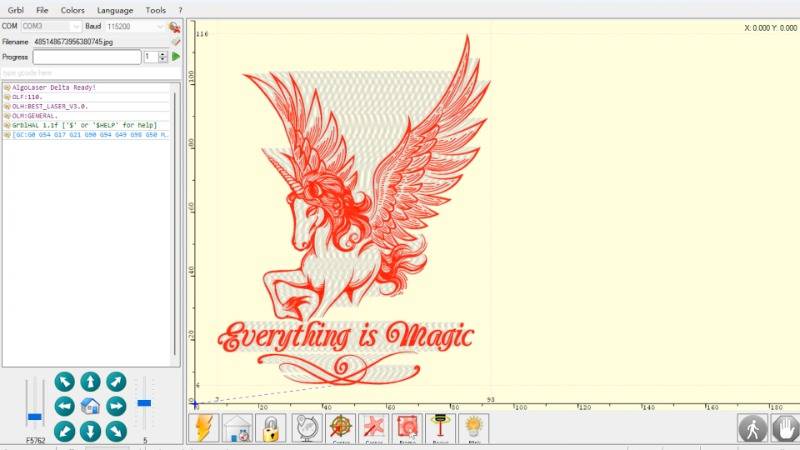
LaserGRBL is a free, open-source laser control program designed primarily for GRBL-based diode lasers.
Despite being free, it's surprisingly capable.
Features
· G-code streaming
· Image conversion
· Raster engraving
· Speed adjustments
· Power controls
· Real-time monitoring
· Basic project management
Advantages
The biggest benefit?
It costs absolutely nothing.
New users can experiment before committing financially.
Drawbacks
Compared with LightBurn, LaserGRBL feels more technical.
Its interface isn't quite as polished.
Design tools are limited.
Many users eventually migrate to more advanced software.
Best For
· Budget-conscious beginners
· Casual hobbyists
· Learning machine basics
· GRBL-compatible lasers
4. Inkscape: Great for Creating Artwork
Technically, Inkscape isn't laser control software.
However, it's one of the most valuable free tools beginners can learn.
What It Does
Inkscape specializes in vector design.
Users can create:
· Logos
· Signs
· Monograms
· Layered artwork
· Mandalas
· SVG files
· Decorative patterns
Benefits
· Completely free
· Open-source
· Large community support
· Excellent SVG export capabilities
Best For
Anyone designing custom projects before importing them into laser software.
Limitations
You still need separate laser control software.
5. Adobe Illustrator
Many graphic designers already use Adobe Illustrator.
If that's you, the transition into laser engraving becomes easier.
Strengths
Illustrator excels at:
· Professional vector graphics
· Typography
· Branding work
· Detailed illustrations
· Commercial design
Best For
· Designers
· Creative professionals
· Branding specialists
Limitations
· Subscription costs
· Steeper learning curve
· Requires additional laser control software
Software Comparison Table
| Software | Cost | Ease of Use | Design Tools | Machine Control | Best For |
|---|
| AlgoOS | Included | Excellent | Basic | Excellent | AlgoLaser beginners |
| LightBurn | Paid | Very Good | Excellent | Excellent | Hobbyists and businesses |
| LaserGRBL | Free | Good | Limited | Good | Budget beginners |
| Inkscape | Free | Moderate | Excellent | None | Artwork creation |
| Adobe Illustrator | Subscription | Moderate | Professional | None | Designers |
Which Software Should Beginners Choose?
The answer depends on your goals.
If You Own an AlgoLaser Machine
Start with AlgoOS.
It removes complexity and builds confidence.
Once you're comfortable, you can explore LightBurn.
If You Want Long-Term Growth
Choose LightBurn.
Its balance between simplicity and professional capability makes it an outstanding investment.
If You Want Free Software
LaserGRBL is difficult to beat.
You can learn fundamental concepts without spending money.
If You Love Designing
Pair Inkscape or Adobe Illustrator with your preferred laser control software.

My Recommendation as a Geek Laser Engraver
After testing countless workflows, here's what I typically recommend.
Stage One: Learn the Basics
Use AlgoOS or LaserGRBL.
Focus on:
· Material settings
· Positioning
· Framing
· Safety habits
· Understanding speed and power
Stage Two: Expand Your Skills
Move into LightBurn.
Learn:
· Layers
· Image processing
· Rotary engraving
· Material libraries
· Advanced optimization
Stage Three: Build a Business
Integrate professional design workflows.
Use:
· LightBurn
· Illustrator
· Inkscape
Together, they provide extraordinary flexibility.
The goal isn't choosing the "perfect" software immediately.
The goal is choosing software that encourages you to keep creating.
Laser engraving should feel exciting—not overwhelming.

Frequently Asked Questions
1. Is AlgoOS free with AlgoLaser machines?
Yes. AlgoOS is included with compatible AlgoLaser machines and provides standalone functionality without requiring additional software purchases.
2. Is LightBurn worth paying for?
Absolutely. Many users consider it the best value in laser engraving because it combines ease of use with advanced professional features.
3. Can beginners use LaserGRBL?
Yes. LaserGRBL is beginner-friendly enough for basic projects, especially if you're using a GRBL-based diode laser and want a free solution.
4. Do I need design software and laser software?
Sometimes. Programs like Inkscape and Adobe Illustrator create artwork, while software such as AlgoOS, LightBurn, and LaserGRBL control the laser itself.
5. Which software is best for starting a laser engraving business?
LightBurn is often the top choice due to its scalability, advanced workflow tools, and compatibility with many laser machines.
6. Should I switch software as I gain experience?
Not necessarily. Many users begin with AlgoOS and continue using it for quick projects while adopting LightBurn for more advanced production tasks.

Final Thoughts
The best laser engraving software for beginners isn't necessarily the most powerful.
It's the one that helps you succeed.
For AlgoLaser users, AlgoLaser AlgoOS offers one of the smoothest introductions available today. It simplifies setup, reduces intimidation, and allows beginners to focus on creativity instead of troubleshooting.
For those seeking a long-term solution, LightBurn remains the gold standard.
If budget matters, LaserGRBL provides impressive functionality at no cost.
And for custom artwork creation, Inkscape and Adobe Illustrator continue to be indispensable companions.
Wherever you begin, remember this: every experienced laser engraver was once staring at their first software screen wondering if they had made the right choice.
Keep experimenting, keep learning, and keep making.
The projects you create six months from now will amaze you.


