


How Do I Choose the Right Rotary Attachment for My Laser Engraver?
A Geek-Level Comparison of RR2 vs ARC vs ARR
If you’ve ever attempted laser engraving round surfaces like tumblers or bottles and ended up with stretched graphics or inconsistent depth, you already understand this truth: rotary engraving is where real precision begins.
Choosing the right rotary attachment for laser engraver is not just a hardware decision—it directly impacts your engraving accuracy, workflow efficiency, and the types of projects you can complete. Whether you're working on stainless steel tumbler engraving, glass bottle laser engraving, or engraving pens with laser, your rotary setup determines your ceiling.
In this guide, we’ll break down the three most practical and widely used solutions from AlgoLaser:
· RR2 (Rotary Roller)
· ARC (Y-axis Rotary Chuck)
· ARR (Simple Rotary Roller)
And more importantly, we’ll analyze their real-world advantages and limitations so you can choose the right tool for your workflow.
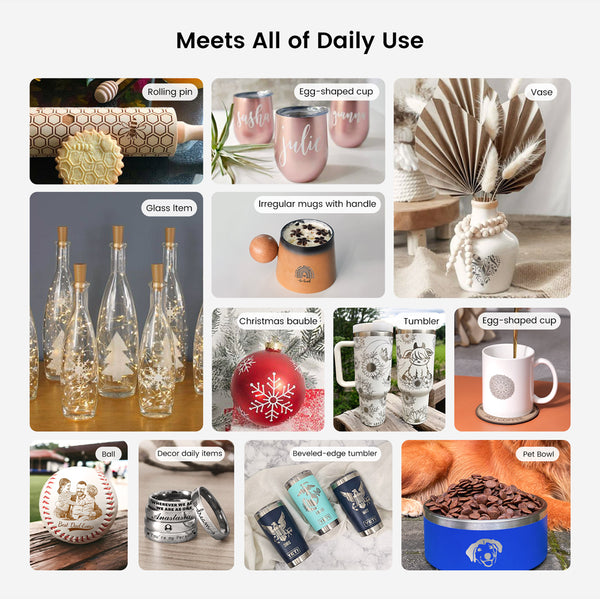
What a Rotary Attachment Actually Does
A laser rotary attachment replaces the Y-axis movement with rotation, enabling rotary axis laser engraving. This allows your machine to function as a 4th axis laser engraving system, making laser engraving curved surfaces possible.
Instead of flat engraving, you can now create:
· laser engraver for tumblers
· engraving wine glasses laser
· engraving metal cups laser
· jewelry rotary engraving
This shift introduces new variables like rotary engraving speed settings, laser power for rotary engraving, and rotary diameter calibration, which must be dialed in for perfect results.
Product Overview (Quick Look)
RR2 – Advanced Roller Rotary
Adjustable 7-gear roller system designed for versatile cylindrical engraving with high stability.
ARC – Precision Chuck Rotary
AlgoLaser Y-axis Rotary Chuck ARC
High-precision chuck rotary with strong clamping force for zero-slip engraving on small or irregular objects.
ARR – Entry-Level Roller Rotary
(Simple structure, lightweight, beginner-friendly rotary roller)
PRODUCT COMPARISON TABLE
| Attribute | RR2 Rotary Roller | ARC Rotary Chuck | ARR Simple Roller |
|---|---|---|---|
| Type | Roller (friction drive) | Chuck (clamp drive) | Basic roller |
| Precision | Medium-High | Very High | Medium |
| Stability | High | Very High | Moderate |
| Slipping Risk | Low (silicone rollers) | None | Medium |
| Object Range | Wide (1–150mm+) | Medium | Limited |
| Setup Difficulty | Easy | Medium | Very Easy |
| Best Use | Tumblers, bottles | Jewelry, pens | Beginners |
| Price Tier | Mid-range | Higher | Budget |
RR2 Rotary Roller: The Versatility King
The RR2 is designed for users who need flexibility across multiple project types. It supports a wide range of diameters and includes 7 adjustable gears for roller spacing, making it ideal for laser engraving cups, laser engraving bottles setup, and large cylindrical objects.
Advantages
· Supports a wide range of object sizes (1–150mm)
· High precision control (~0.35° accuracy)
· Adjustable height for irregular shapes
· Silicone rollers reduce slipping
· Can engrave long objects (up to 135 cm)
Disadvantages
· Still relies on friction → possible slipping on glass
· Not ideal for very small objects like rings
· Requires proper alignment to avoid rotary engraving distortion fix issues
Best For
· rotary attachment for tumblers
· metal engraving rotary projects
· Batch production workflows
💡 Geek Insight: RR2 balances engraving consistency improvement and flexibility better than most roller systems.
ARC Rotary Chuck: The Precision Beast
The ARC replaces friction with clamping, making it the best option for high-precision rotary engraving.
Advantages
· Zero slipping (direct clamping)
· Highest rotary engraving accuracy
· Ideal for small and irregular shapes
· Excellent for engraving pens with laser and jewelry rotary engraving
Disadvantages
· Slower setup (requires centering)
· Limited diameter range
· Not ideal for large tumblers
Best For
· Precision engraving
· Small-diameter objects
· professional rotary engraving tool workflows
💡 Geek Insight: If your work involves fine detail, ARC eliminates the biggest issue in rotary engraving—friction inconsistency.
ARR Simple Rotary Roller: The Beginner Option
The ARR is a stripped-down version of a roller rotary, designed for simplicity and affordability.
Advantages
· Very easy to use
· Budget-friendly
· Quick setup
Disadvantages
· Limited adjustability
· Lower grip stability
· Not suitable for heavy or irregular objects
· Less effective for engraving consistency improvement
Best For
· Beginners
· Light-duty engraving
· Occasional projects
💡 Geek Insight: ARR is great for learning rotary engraving vs flat engraving, but not ideal for scaling production.
Real-World Use Case Mapping
Understanding your workflow is key to choosing the right tool.
Tumblers & Bottles
· Best: RR2
· Reason: Flexibility + stability
Glass Engraving
· Best: ARC
· Reason: Prevents slipping
Pens & Jewelry
· Best: ARC
· Reason: High precision
Beginner Projects
· Best: ARR
· Reason: Simplicity
Performance Factors That Matter More Than You Think
1. Steps Per Rotation
Incorrect steps per rotation laser rotary causes:
· Distorted images
· Misalignment
· Scaling issues
Always calibrate using:
· rotary diameter calibration
· roller diameter setting LightBurn
2. Speed and Power Optimization
Proper rotary engraving settings ensure clean results:
· Lower speeds → better detail
· Balanced laser power for rotary engraving → prevents burn
3. Focus and Alignment
Correct laser focus for curved surfaces is critical for:
· Uniform depth
· Clean engraving
· Reduced defects
4. Stability and Torque
A strong stepper motor rotary attachment ensures:
· Smooth motion
· Better laser accuracy optimization
· Consistent engraving
Common Mistakes (Across All Three)
· Ignoring calibration → distorted designs
· Poor grip → slipping issues
· Wrong rotary type → poor results
· Incorrect focus → uneven depth
Fixing these improves engraving quality enhancement dramatically.
Final Recommendation
If you’re serious about rotary engraving, here’s the truth:
· RR2 → Best overall for versatility and production
· ARC → Best for precision and professional work
· ARR → Best for beginners and entry-level use
🔥 Best Setup (Geek Approved)
Use RR2 + ARC together
→ Covers 95% of real-world engraving scenarios
Final Thoughts
Choosing the right laser engraver rotary tool is about matching your tool to your workflow—not just buying the most expensive option.
Once you master:
· rotary engraving setup
· LightBurn rotary configuration
· Calibration and alignment
You move beyond hobby-level engraving into true production capability.
At that point, your machine isn’t just engraving—it’s manufacturing.


